Introdução aos Tipos de Ticket e Problemas Comuns
Bambu Lab is committed to providing the best customer support. We are constantly improving our processes and providing our customers with consistently fast service.
When you encounter problems with your printer, it is recommended that you first browse the official Wiki to find solutions. If you still can’t find the answers to your problems, consider creating a support ticket to upload a print log. Professional after-sales service staff will help you analyze the problems and give you solutions and suggestions.
Type of Support Ticket
General Ticket
General Inquiries applies to the following:
Technical Ticket
Technical Ticket applies to the following types of questions:
When you fill out all required fields on the technical support page, please provide as much information as possible, such as attaching printer logs, correctly selecting the issue type, providing pictures and videos, and detailed information about the issue you’re facing, which will allow us to provide a quick and accurate solution to your inquiry.
> We also recommend reading Issue type classification tips and tricks for information on printer hardware and how to open support ticket in the correct location.
> * If you encounter any issues related to MakerWorld, such as models, appeals, point redemption issue, etc., we recommend submitting a MakerWorld support ticket.
> * Please click here for detailed information.
FAQ
What are log files? Why are they required when submitting a technical support ticket?
Printer logs record abnormal information during the printer operation process. Analyzing these logs helps the support team quickly identify problems and provide solutions. Including log files when submitting a technical ticket improves problem-solving efficiency, saves time, and reduces the need for repeated communication.
If you encounter a situation where you cannot export the logs but the ticketing system requires you to upload them, you can select “Visible Structural Damage to Printer/AMS Components” to submit your request. We will assess the situation and evaluate the necessity of uploading the logs for the issue.
What kind of video needs to be uploaded? What if the printer does not have time-lapse recording turned on?
If you encounter a printer issue, you can use your phone to record a video describing the problem. Depending on the type of issue, we offer the following suggestions:
If you encounter an intermittent issue, we recommend checking if there is any time-lapse recording on the microSD card. This can assist in diagnosing the problem.
My printer is not connected to the internet, so I cannot log into my account. How can I upload log files?
In addition to uploading logs via the cloud when your printer is connected online, you can also upload the log files directly from the microSD card through the website.
For details, please refer to: How to Upload the Log Files.
My issue is not listed in the options. How can I submit a technical ticket?
If your issue is not listed in the options, you can select Other option to submit your issue.
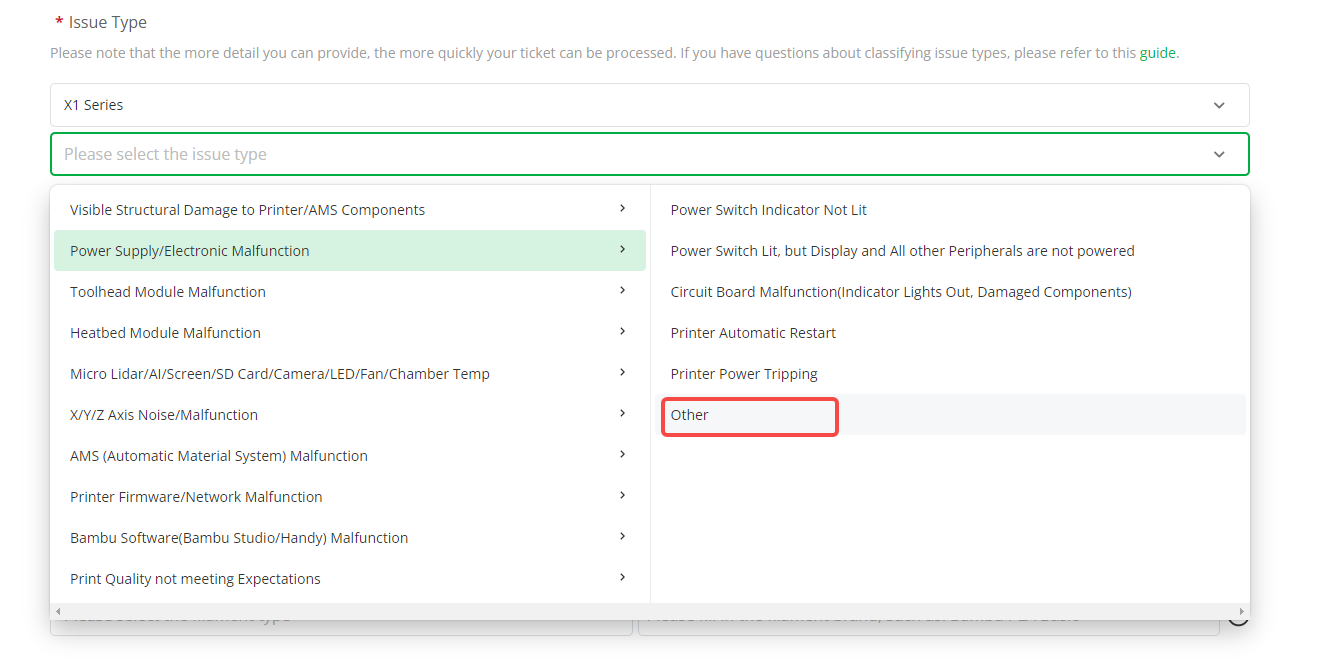
In this case, we will not force you to upload pictures, videos or printer logs, but this may affect our diagnosis of the problem. We recommend that you try to select the most accurate issue when creating a support ticket.
If follow-up technical support personnel recommend that you record a video or upload a log, please provide it as requested. The information is important for us to diagnose and resolve problems.
We understand that providing this information may sometimes be inconvenient, but we believe that with your cooperation, we can resolve your issue more efficiently. If you encounter any difficulties while providing the requested information, please let us know, and we will do our best to assist you.
End Notes
> We hope this guide has provided clear and practical support.
> If the issue remains unresolved, please submit a support ticket and include your recent printer logs and additional pictures or other details. Our technical team will review your request and provide detailed assistance.
> You can also visit Bambu AI, which can instantly answer common questions and provide you with operational guidance.
🛠️ Precisa de Peças Originais Bambu Lab?
A 3D Centro Oeste é especialista em impressoras 3D com estoque a pronta entrega de peças oficiais Bambu Lab no Brasil com envio imediato. Garanta bicos de aço endurecido, hotends montados, engrenagens da extrusora, placas PEI e filamentos com nota fiscal e garantia.