Air Printing Detection
Bambu Lab A1 • Série Bed-Slinger A1
Air Printing Detection
What is air printing detection?
In the 3D printing process, sometimes due to some reasons, the nozzle can not extrude the filament properly, resulting in “air printing”. The following gif shows the air printing of A1:

The A1 series printers are equipped with an air printing detection function. When printing with AMS lite, the printer monitors the sensor information of the AMS lite odometer in real-time. When it detects that the extruder cannot extrude the filament and the “air printing” occurs, the printer automatically cuts the filament and unloads it, pausing the printing task and reporting the error.
How to detect air printing?
When the A1 series printer works with AMS lite, after the AMS lite successfully feeds the filament to the extruder, only the extruder pulls the filament for extruding. In the process of extruding, the odometer inside the feeder will rotate passively as the filament is sent out, and the mileage length of the filament can be calculated. If the expected feed length in the print G-code has been increasing, and the count of the feeder’s odometer has remained the same, it will be judged as “air printing”. The location of the odometer is shown below:
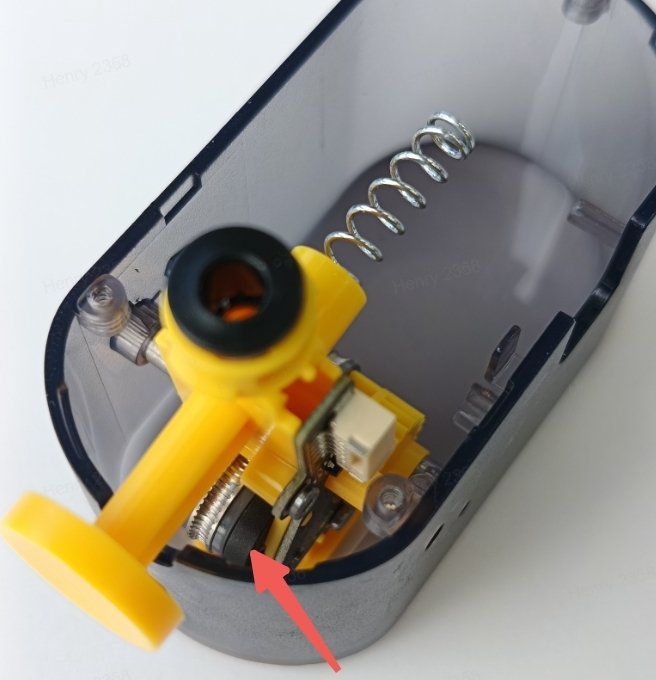
Because the air printing detection is based on the abnormal extrusion length of the filament calculated by the feeder, in this judgment process, there will be a certain degree of “air printing”. If you solve the extrusion problem and continue printing, the print may have defects such as under-extrusion. If the defect is acceptable, you can choose to continue printing, otherwise, you can stop the printing task and restart printing.
Enable air printing detection and applicable conditions
Starting from firmware version 01.02.00.00, A1 series printers begin to support the air printing detection function. You can enable this feature on the AMS Options page of the screen, as shown in the following figure:
 |
 |
In addition, the use of the air printing detection function requires the following two conditions to be met:
- Printing with AMS lite;
- The diameter of the nozzle used by the printer is greater than or equal to 0.4mm.
The difference between air printing detection and filament tangle detection
A1 series printers are equipped with a filament tangle module, which also detects some conditions that may cause “air printing”, you can refer to the wiki for details: Introduction to Filament Tangle Detection | Bambu Lab Wiki
Although these two functions are both aimed at detecting the issue of “being unable to extrude smoothly during the printing process”, they have certain differences in the applicable scenarios:
- Air printing detection: The application scenario is usually that the external feed resistance is normal, but the printer is still unable to extrude properly, which is usually caused by an exception inside the tool head. Common causes of error: nozzle clog, extruder clog or gear abnormality, filament diameter being too thin, and the filament and extruder gear slipping.
- Filament tangle detection: The applicable scenario is usually used to detect excessive external resistance, which causes the extruder to be unable to smoothly pull the filament during the printing, resulting in poor extrusion. Common causes of errors: tangled or knotted filaments on the spool, and excessively long or severely bent PTFE tubes.
Notas Finais
Esperamos que o guia detalhado fornecido tenha sido útil e informativo.
To ensure a safe and effective execution, if you have any concerns or questions about the process described in this article, we recommend submitting a chamado técnico relatando o seu problema.
Por favor, inclua uma foto ou vídeo ilustrando o problema ao enviar o chamado técnico.