Air Filter Cover and Air Filter Replacement Guide for the P2S/X2D
Bambu Lab X2D • Série Avançada X2
Air Filter Cover and Air Filter Replacement Guide for the P2S/X2D
Air Filter Cover and Air Filter
🔎 Find the X2D Air Filter in the Bambu Lab store.
Air filter cover: A detachable shell which allows air to pass through that holds the filter in place and stops debris from interfering with it or the exhaust fan.

Air filter: A replaceable activated-carbon filter inside the right chamber liner. It removes VOCs produced during printing.

When to Use This Guide
Air filter
- Replace after about 1,440 hours of printing time
Air filter cover
- If the cover becomes damaged or deformed
Required Tools and Materials
- Air filter cover
- Air filter
Aviso de Segurança
IMPORTANT!
Always power off and disconnect power on the printer before performing maintenance work. Not doing so means there is a risk of electric shock, short circuit, and damage to the printer or surrounding area.
When a maintenance task necessitates the printer being powered on, use insulated gloves for safety and pay special care not to pinch, damage, or put pressure on any exposed wires, connectors, or circuit boards. Additionally, the nozzle can be extremely hot so never touch it with exposed skin.
If you have any questions or concerns related to the above or the steps in this guide, please open a new ticket in our Support Page for assistance.
Removing the Air Filter Cover and Air Filter
Passo 1: Move the Heatbed
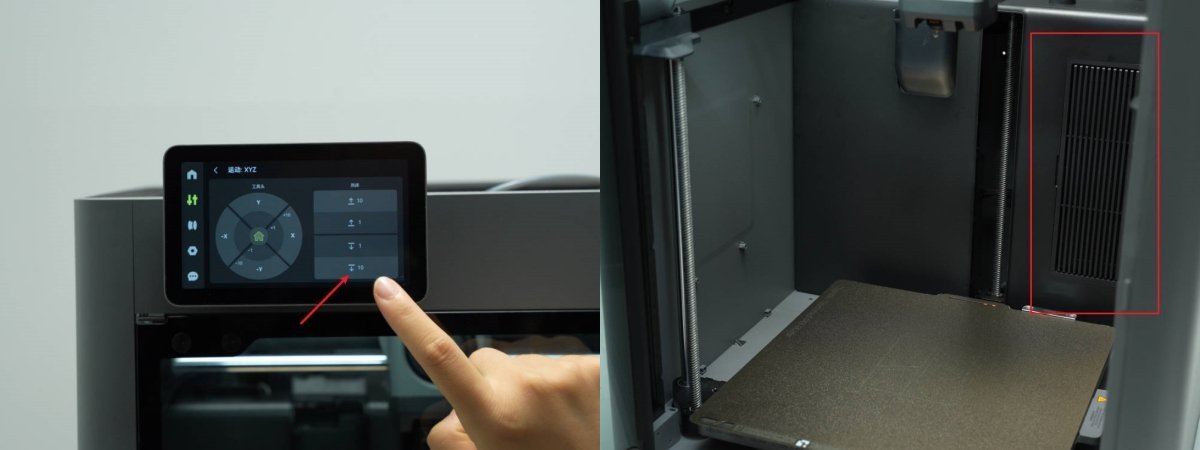
Using the screen of the P2S, lower the heatbed to the bottom of the printer. This will mean the bed is not obstructing access to the filter.
Passo 2: Remove the Air Filter Cover
The air filter cover is secured by a clip on its left side. Push the left side of the air filter cover to the right to disengage the clip and remove the cover.
If the air filter cover is relatively tight, you can use tweezers to get a more secure grip on the cover and pull it out.

Passo 3: Remove the Air Filter
Pull on the tab at the top or bottom of the air filter to pull it out of its compartment.

Installing the Air Filter and Air Filter Cover
Passo 1: Install the Air Filter
Align the replacement air filter and gently push it into the compartment so that it is fully seated and flush.

Passo 2: Install the Air Filter Cover
Insert the tabs on the right side of the air filter cover into the corresponding slots and rotate the cover into place, pushing until the clips engage and the cover is flush.

Verifying Functionality
The air filter cover is flush and even with the surrounding wall of the enclosure.
Notas Finais
We hope this guide has provided clear and practical support.
If the issue remains unresolved, please submit a support ticket and include your recent printer logs and additional pictures or other details. Our technical team will review your request and provide detailed assistance.
You can also visit Bambu AI, which can instantly answer common questions and provide you with operational guidance.