X2D Firmware Release History
Bambu Lab X2D • Série Avançada X2
X2D Firmware Release History
01.02.00.00(20260730)
New Features
- Added support for powering off the XY-axis and extruder motors while drying filament in the chamber, keeping only the heatbed lift motor powered — delivering lower energy consumption and quieter operation.
Feature Optimizations
- Improved spaghetti detection: Faster detection speed and higher detection rate, with fewer false positives during multi-color prints and prints with complex textures.
- Optimized the visual detection algorithm — users no longer need to perform liveview camera calibration.
- Optimized the default extrusion compensation parameters for certain filaments, improving print quality in specific scenarios.
- Improving the stability and reliability of cloud services.
01.01.01.00(20260520)
New Features
- Added Z-axis motor noise reduction.
- Added detection for abnormal toolhead changes during printing, enabling more timely identification of issues caused by external forces.
Feature Optimizations
- Fixed issues in scenarios such as nozzle offset calibration, external spool detection, and loading/unloading filament with the auxiliary extruder, improving overall stability.
- Optimized build plate offset and print displacement detection, improving recognition reliability in complex scenarios such as abnormal lighting conditions.
- Fixed issues with AMS2 Pro drying after power loss and filament feed jams, improving the stability of filament loading/unloading and drying.
- Optimized the waiting experience when the device enters the guided setup process.
- Optimized endstop detection during extruder switching.
01.01.00.00(20260414)
New Features
1. Added support for the Filament Switching Adapter
- The filament track switch is specially designed for dual-nozzle printers, equipped with 2 filament inlets and 2 filament outlets, and supports seamless mapping between AMS and dual nozzles. For more details, please refer to Filament Track Switch User Guide.
- This feature requires Bambu Studio v2.5.3.60 or later , Bambu Handy V3.18.0 or later.
 |
 |
2. Added support for “Print While Drying” feature
Note: Please be aware of power limits. The drying temperature must not exceed the filament’s softening temperature. Using this function requires an additional AMS external power supply, which must be purchased separately.
3. Added support for remote activation of filament drying
 |
 |
 |
4. Added support for the High-Flow Hotend
- This feature enables faster printing speeds with the optional High-Flow Hotend (sold separately).
- It requires Bambu Studio V2.5.3.60 or later and Bambu Handy V3.18.0 or later.
5. Added support for saving timelapse videos locally (no USB flash drive required)
Also supports exporting internal time-lapse files and deleting internal/external time-lapse files.

6. Added support for Curve Planning Enhancement
Improves how the printer processes curved paths which results in better surface quality in certain scenarios, especially on rounded features.
7. AI failure detection pop-ups now display live camera snapshots
Live feed pop-ups are now supported for Camera Obstruction, Foreign Object, Spaghetti, Print Loosening Detection and Nozzle Clumping Detection.

8. Optimized user onboarding experience
A new orientation process has been added to help new users quickly get started and complete their first print. The orientation can be revisited later via “Toolbox – Beginner Guide.”

9. Detailed explanations added to error code pop-ups
Integrated with HMS to display possible error causes.

10. Added Low-Power Mode for the heatbed
Designed for users with limited power supply environments. It lowers the maximum peak power by extending the heatbed’s heating time.

11. Added support for “Disable Motor” mode for XYZ axes to facilitate maintenance and repairs

12. Added Foreign Object Detection beneath the heatbed
The printer now performs a pre-print check to detect any obstructions under the heatbed reducing the risk of collisions or mechanical strain.
13. Added support for First Layer Quality Calibration
- Supports fine-tuning the distance between the nozzle and the heatbed during first layer printing, thereby improving first layer adhesion and surface smoothness.
- Note: This feature is for pro users needing precise adjustments across diverse printing environments. Standard settings remain optimized for most use cases; please use this feature only as required for advanced troubleshooting or optimization.

14. Newly added information about regulation certifications

15. Added support for live camera firmware upgrades, and optimized image quality in certain scenarios
16. Updated demo models, optimizing the print quality of some demo models
17. Added screen brightness adjustment

18. Added Print Loosening Detection
This feature uses a live camera inside the printer chassis to continuously monitor for print loosening and collapse during printing. Users need to enable the print loosing detection switch in the UI interface under “Settings -> Print Options -> AI Detection”.
 |
 |
19. Adjust the AI detection switch option on the printer settings page
- Build Plate Presence Detection enabled by default. Intelligently detects and prompts the user if they forget to place the build plate, preventing other abnormal print failures.
- Added toggles for foreign object detection
- Added toggles for print loosening detection. (“printed part displacement detection” in UI)

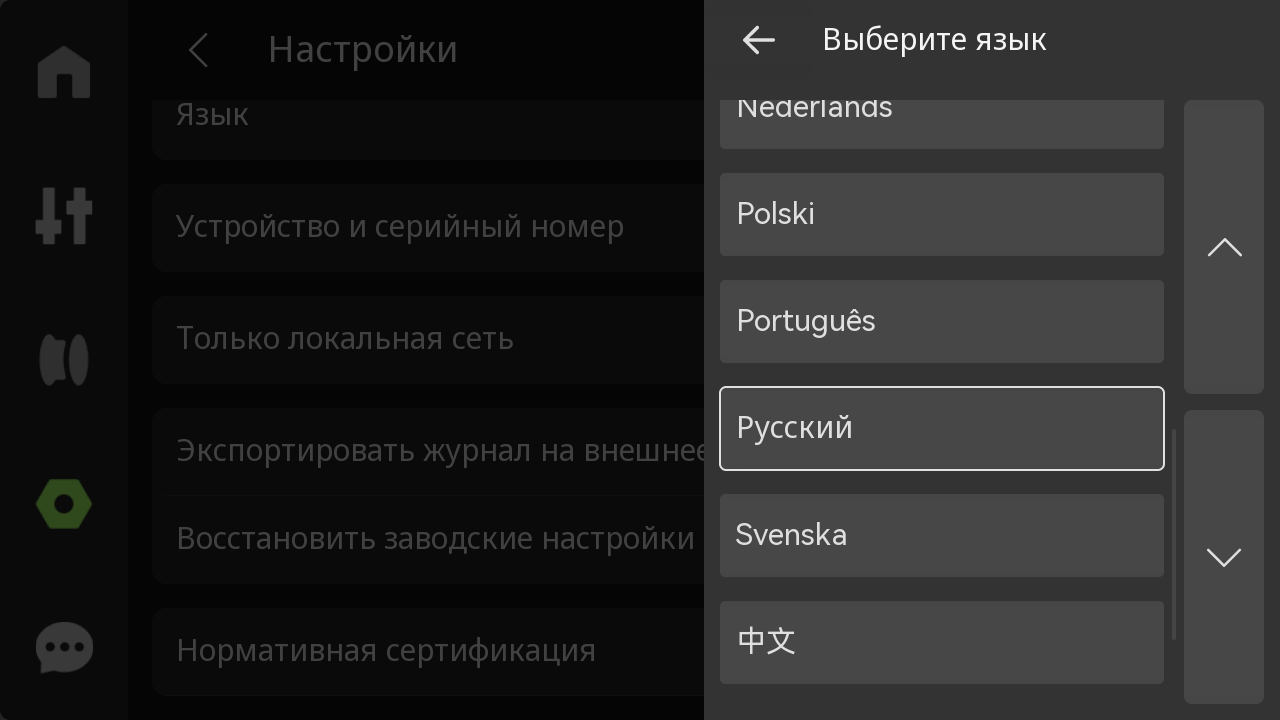
20. Added support for Russian in the new printer UI
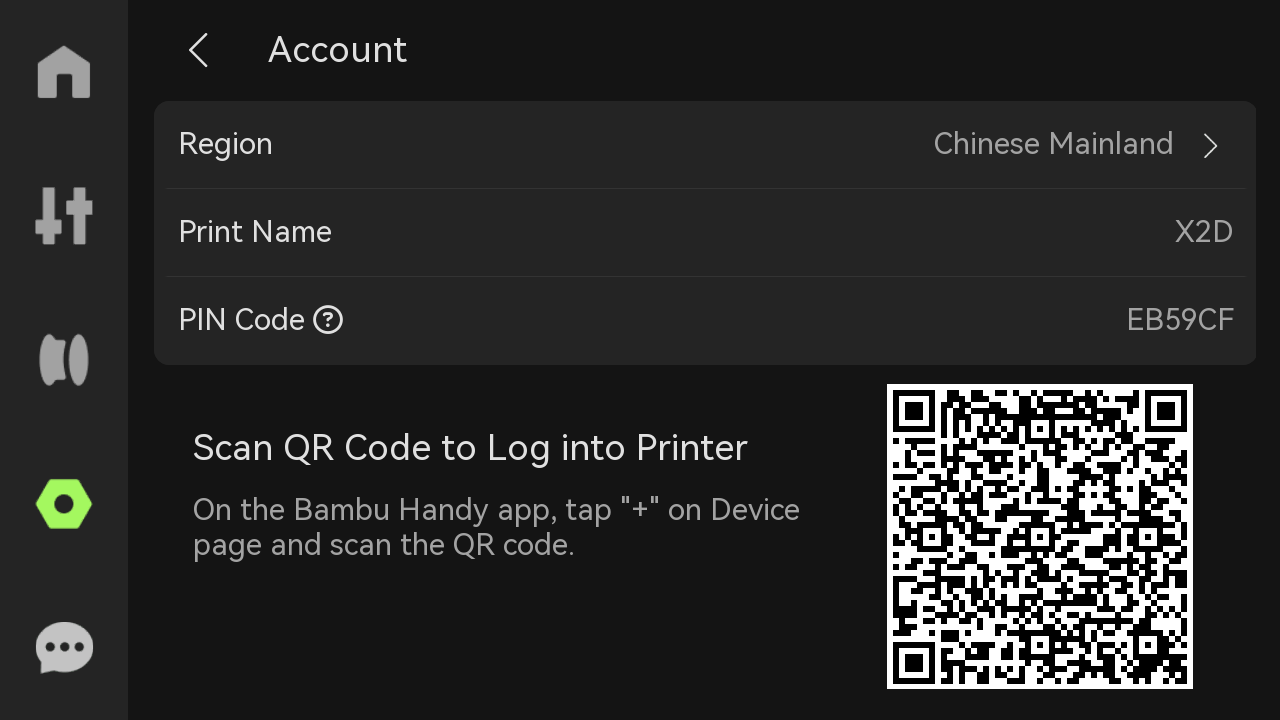
21. New PIN Code Binding Feature
- After enabling this feature, binding no longer requires the printer and computer to be connected to the same local network. As long as the necessary interfaces and protocols can communicate across different networks, the printer can be bound in Bambu Studio using a PIN code.
- This feature requires Bambu Studio to be updated to version 2.5.3.60 or higher.
22. New “Send Current Plate to Built-in Storage and Print” Feature
- This feature allows users to send the current plate to the printer and start printing even without external storage (USB drive).
- This feature requires Bambu Studio to be updated to version 2.5.3.60 or higher.

23. New “Send to Built-in Storage and Print in LAN-Only Mode” Feature
This feature allows users to initiate remote printing using the printer’s built-in storage in LAN-only mode, even without external storage (USB drive). This feature requires Bambu Studio to be updated to version 2.5.3.60 or higher.
24. New Nozzle Heating Component Maintenance Mode Feature
When this feature is enabled, the heating component can be warmed up even without the hotend installed. This facilitates certain maintenance and repair scenarios, allowing users to perform toolhead-related maintenance.
25. Added Toolhead Cover Detection & Protection
Feature Optimizations
- Optimized the interaction flow of the upgrade process.

- Optimize AI detection algorithms to improve the detection efficiency of foreign objects detection and Nozzle Clumping Detection.
- Optimized the timelapse output for more stable footage.
- Optimized the idle-state protection feature to support automatic heatbed cooldown when the printer remains idle.
- Improved overall stability.
Optimized system, network, and connectivity stability, and fixed several rare bugs.
Notas Finais
We hope this guide has provided clear and practical support.
If the issue remains unresolved, please submit a support ticket and include your recent printer logs and additional pictures or other details. Our technical team will review your request and provide detailed assistance.
You can also visit Bambu AI, which can instantly answer common questions and provide you with operational guidance.